Hardening scan
The Hardening scan checks your devices against the AXIS OS Hardening Guide in its two levels, Basic and Extended. You see one column per check and a result per device: pass, warning, fail, could not be read, or does not apply. The scan only reads. It never changes a device.
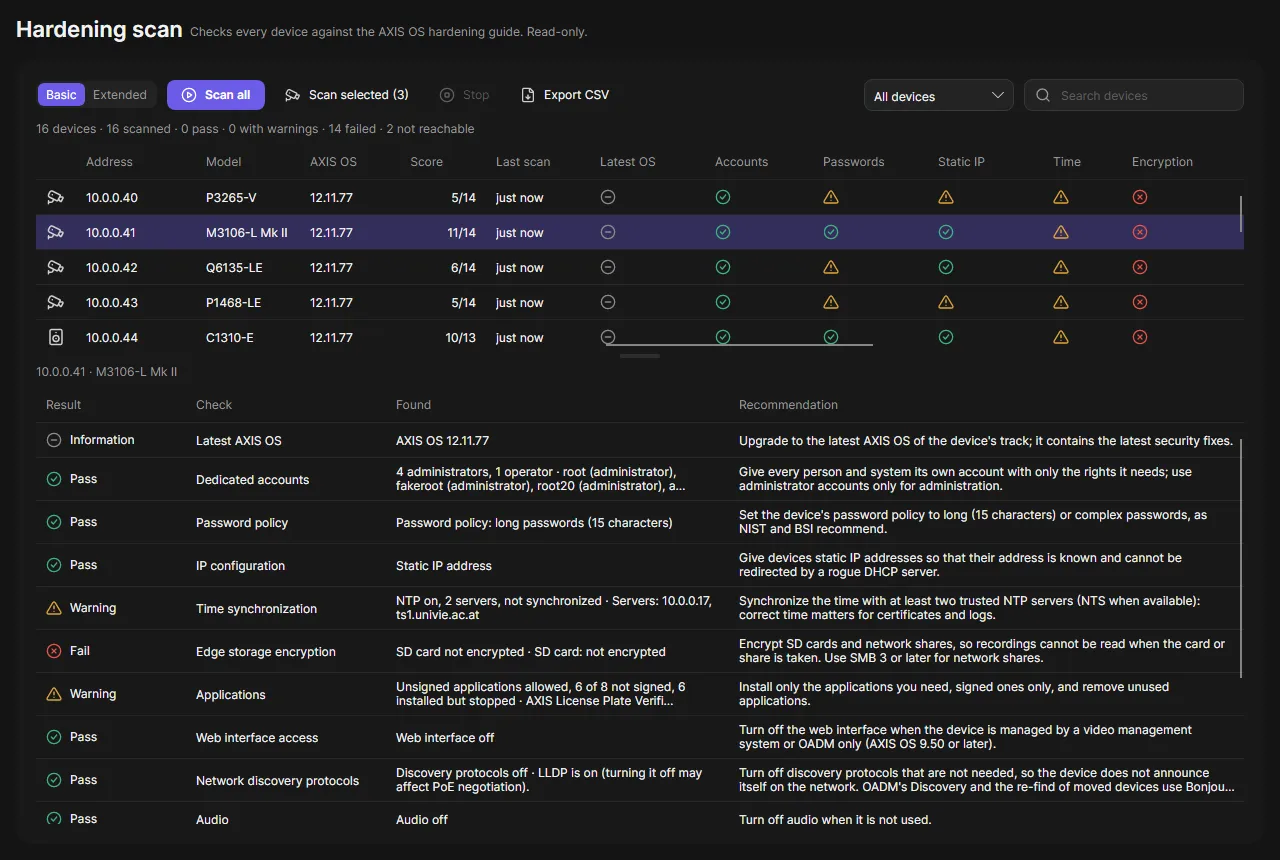
Scan your devices
Section titled “Scan your devices”- Open Hardening scan in the navigation rail.
- Choose Basic or Extended.
- Click Scan all, or Scan selected to scan only the devices selected on the Devices page.
- Watch the progress row. Stop ends the scan; the devices already scanned keep their result.
- Click a device to see its checks in Selected device: the value found and the recommendation of the guide. Failed checks come first.
Hover a result for the details. The summary line counts the devices that were scanned, pass, have warnings, failed or could not be reached. Use the status filter (Failed, Warnings, Not scanned) and the search box to find devices.
Export CSV saves the shown devices with the result and value of every check.
What is checked
Section titled “What is checked”Basic covers the checks of the guide that OADM can read from the network, for example user accounts, password rules, static IP address, time synchronization, SD card encryption, applications, SSH, discovery protocols, firewall and HTTPS ciphers. Extended adds certificates, remote syslog, SNMP, RTSPS and OAuth, plus HTTPS only, IEEE 802.1X, brute-force protection, access log, signed video and Network Time Security.
Some rules to know:
- SSH turned on fails the check.
- The web interface, discovery protocols and DHCP turned on are warnings.
- Bonjour turned on is a warning. Note that OADM’s Discovery and the re-find of moved devices use it.
- The AXIS OS version is shown for information only and is not rated.
- Checks the guide lists but that cannot be checked over the network are not shown.
The score is the number of passed checks out of the rated ones. A device passes when none of its checks is a warning or a failure.
Good to know
Section titled “Good to know”- OADM scans 16 devices at a time.
- Devices that are unreachable, need a login, have no password yet or have a changed certificate are not contacted.
- The last result of every device is kept on the server and shown with its scan time, also after a restart.
- A scan writes no audit entry.