Date and time
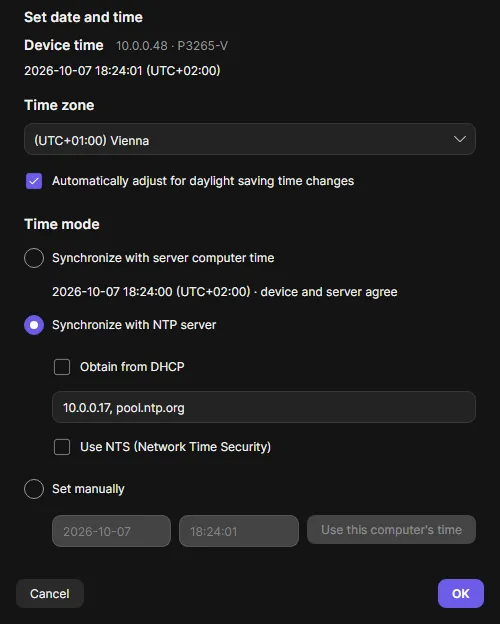
Date and time is the “Set date and time” dialog you know from AXIS Device Manager. It works on any number of devices. It is in the context menu under Maintenance.
Run it
Section titled “Run it”- Select the devices, right-click and choose Maintenance > Date and time.
- Device time shows the clock of the first selected device, ticking live.
- Choose the Time zone. Type a city name to jump to it. Leave Automatically adjust for daylight saving time changes on where daylight saving applies.
- Choose the Time mode:
- Synchronize with server computer time: the devices get the time and time zone of the OADM server. NTP is turned off.
- Synchronize with NTP server: Obtain from DHCP, or up to 5 servers separated by commas. Use NTS (Network Time Security) appears when a selected device supports it.
- Set manually: date and time in the device’s time zone, or Use this computer’s time. NTP is turned off.
- Click OK.
Like in ADM, OK always writes the time zone and the time mode to every selected device. There is no “keep unchanged”. Values a device already has are skipped.
The dialog opens with the first device’s time zone and mode. OK stays disabled until a time zone is chosen and every field is valid. Hover it to see why.
Requirements
Section titled “Requirements”- Setting the date and time needs the Time API (AXIS OS 9.30 or later). Older devices fail that step with “Nothing was changed”.
- Time zone and NTP also work on older firmware, with one NTP server only.
- NTS needs a device whose AXIS OS supports it. The check box is shown only then.
The dialog notes below the chosen mode how many devices cannot do it, for example “500 of the selected devices have no Time API”.
Check compatibility, Read current time settings, Read NTP settings, Validate settings, Set time zone, Set NTP configuration or Turn off NTP, Set date and time, Verify time settings, Verify NTP settings.
OADM reads every value back. A different value or a clock more than 3 seconds off ends the task with a warning.