Device tasks
A device task changes something on your devices: firmware, network settings, users, applications, certificates. You start it from the device list, like in AXIS Device Manager.
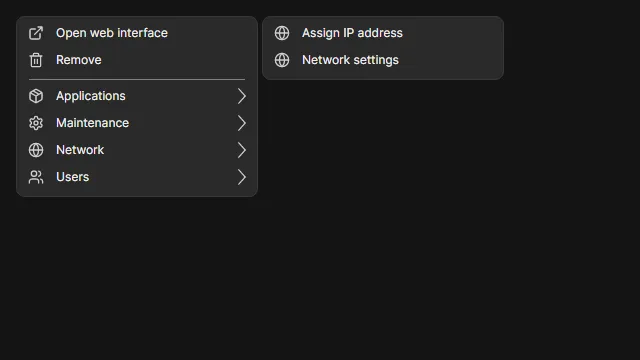
Run a task
Section titled “Run a task”- Select one or more devices on the Devices page.
- Right-click the selection. The context menu has one submenu per group: Applications, Maintenance, Network, Security and Users.
- Choose the task. Tasks that need input open a dialog first. Restart, Enable HTTPS, Renew certificates and Use OADM as NTP server start right away.
- Watch the tasks in the Tasks pane below the device list.
Some tasks also have a toolbar button: Restart, Upgrade firmware and Assign IP address.
A greyed entry cannot run on the selection. Hover it to see why, for example “Needs AXIS OS 11.11 or later (this device has 11.9.65)”. With several devices selected, the tooltip names the most common reason and how many devices it concerns.
How tasks run
Section titled “How tasks run”- One task per device. Running a task on 20 devices creates 20 tasks. A failing device never marks the others as failed.
- Steps. Every task shows each request and each wait as its own step, for example “Upload firmware” or “Wait for the device to come back”. The Current step column and the task details show where a task is.
- Compatibility first. Before the first change, OADM reads the device’s current list of supported functions again. If something is missing, the task fails with “Nothing was changed”.
- Input checked first. Addresses, passwords and files are checked before OADM touches the device.
- No lock-out. OADM never removes or demotes the account it uses itself. Changes that can make a device unreachable ask for confirmation first.
All tasks
Section titled “All tasks”| Task | Group | What it does |
|---|---|---|
| Restart | Maintenance | Restarts the device and waits until it answers again. |
| Upgrade firmware | Maintenance | Installs an AXIS OS file, verifies the new version and commits it. |
| Date and time | Maintenance | Sets the time zone and the time mode: server time, NTP server or manual. |
| Use OADM as NTP server | Maintenance | Points the device to the NTP server of OADM. |
| Network settings | Network | Sets IPv4, IPv6, DNS and host name. |
| Assign IP address | Network | Assigns DHCP or addresses from an IP range, like ADM. |
| Users | Users | Adds, changes or removes user accounts. |
| Applications (ACAP) | Applications | Installs, upgrades, starts, stops and removes applications. |
| Enable HTTPS, Disable HTTPS | Security | Issues an HTTPS certificate from the OADM CA, or switches to HTTP only. |
| Enable IEEE 802.1X, Disable IEEE 802.1X | Security | Issues a client certificate and turns 802.1X on, or turns it off. |
| Renew certificates | Security | Renews the HTTPS and 802.1X certificates OADM issued. |
| View certificates, Delete certificates | Security | Lists or deletes the certificates on the devices. |
| Install certificates, Install CA certificates | Security | Installs your own certificate files or CA certificates. |
Restart
Section titled “Restart”Restart sends the restart, waits for the device to go offline and to come back (at most 3 minutes), and checks the serial number. A device that does not answer at the start fails with “Nothing was changed”.
Watch and manage tasks
Section titled “Watch and manage tasks”The Tasks pane shows every task with its status, current step and progress. See Tasks.