DHCP server
The OADM server can hand out IPv4 addresses on one network interface. This helps when you commission devices on a network without a DHCP server. OADM can also add new Axis devices automatically as soon as they get an address.
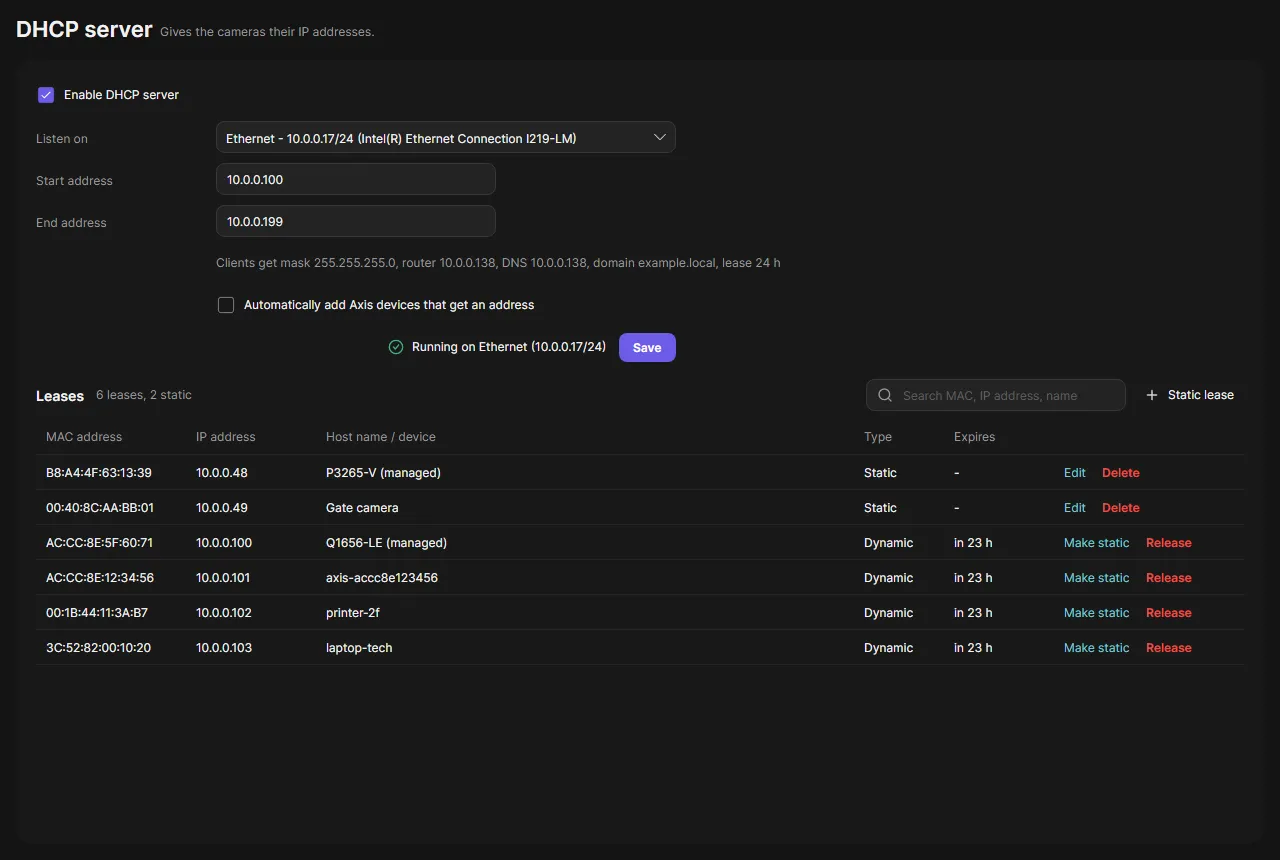
Turn on the DHCP server
Section titled “Turn on the DHCP server”-
Open DHCP server in the navigation rail.
-
Check Enable DHCP server.
-
In Listen on, choose the network interface. It needs a static IPv4 address.
-
Enter the Start address and End address of the range. Both must be inside the interface’s subnet.
The line below shows what the clients get: subnet mask, router, DNS and lease time, taken from the interface.
-
Optional: check Automatically add Axis devices that get an address.
-
Click Save.
OADM first looks for other DHCP servers on the network. If it finds one, it asks before it starts.
-
Check the status next to Save. It says, for example, “Running on Ethernet (10.0.0.17/24)”.
Leases
Section titled “Leases”The lease list shows every address OADM handed out: MAC address, IP address, host name or device, type and expiry. Devices OADM manages show as, for example, “P3265-V (managed)”.
- Static lease gives a device always the same address. The address may be outside the range.
- Make static turns a dynamic lease into a static one.
- Release frees a dynamic lease. Delete removes a static lease.
Add devices automatically
Section titled “Add devices automatically”With the check box on, every Axis device that gets an address is added to OADM. OADM logs in with the credential list. A device without a password yet is added as “Password not set”; use Set password in its context menu. A device where no credential fits is added as “Credentials required”; use Log in.
When a device that OADM already manages gets another address, OADM follows it. This also works with the check box off.
When the port is in use
Section titled “When the port is in use”The DHCP server needs UDP port 67. If the status says “Port 67 is in use by another program” or “Insufficient permission to use port 67”, see your system:
Stop the DHCP Server role (net stop DHCPServer) or Internet Connection Sharing (net stop SharedAccess) if they run.
The installed service opens the Windows firewall for UDP 67 by itself while the DHCP server is on.
The server must run as root, or allow it once with
sudo setcap 'cap_net_bind_service,cap_net_raw=+ep' <server exe>. dnsmasq, isc-dhcp-server and shared connections of
NetworkManager must not hold port 67.
The server must run with sudo. The installed service runs as root. Internet Sharing must be off.
Good to know
Section titled “Good to know”- Before an address is handed out, OADM checks that nothing answers at it.
- Leases are kept when the server restarts. A device gets the same address again.
- The settings, static leases and Release need an administrator.